Olive & Thyme Seasonal food. Good company. | |
FRESH FROM THE KITCHEN A new season. A new favorite. | |
 | |
| |
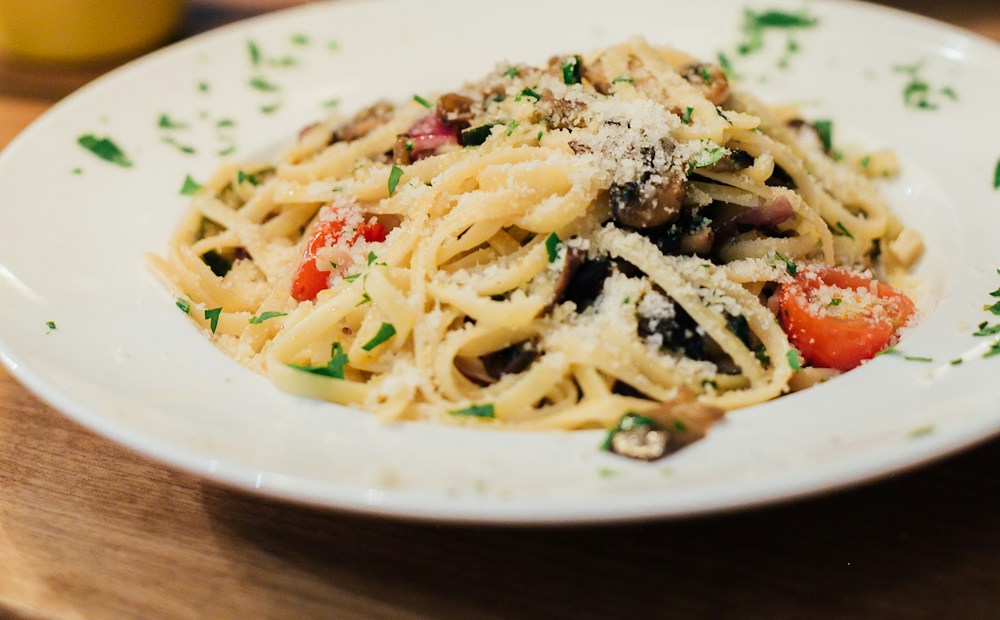
There’s something special coming out of our kitchen. Meet Wild mushroom & herb pasta — made with the season’s best ingredients and a little love from our team. A complimentary glass of wine with every main Pull up a chair. We’ve saved you a spot.
| |
Olive & Thyme [Add your restaurant’s mailing address]Unsubscribe link: add this in your sending platform |
AN EDITABLE RESTAURANT EMAIL
New Menu Announcement Email Template
Introduce a seasonal dish or a new restaurant menu with a clear announcement, a food photo, and a link to the full menu. Customize this example and export the HTML for your sending platform.
Content updated
Customize this templateNo account needed. Edit in your browser and export HTML.
What should this email include?
A new menu announcement email should name the dish or menu, say when it is available, and give guests one clear next step. Use the main button for the current menu or a booking page. If you include an offer, explain its conditions before sending.
Subject line ideas
- A new season, a new menu at [Restaurant]
- Meet [Dish], fresh from our kitchen
- Your first look at our [Season] menu
Replace bracketed details with your restaurant’s information.
How to customize this template
Name what is new
Replace the sample pasta with your actual dish or menu. Add a short description that helps a guest decide whether it is for them.
Set the availability and offer
State the first service date, days available, and any offer conditions. Remove the complimentary wine example if you are not running that offer.
Use a current photo and destination
Choose a public image URL for your food and link the button to the updated menu. Export HTML, import it into your email platform, and send a test.
Example email
Olive & Thyme is a sample restaurant. Replace the sample dish and offer before sending.
SubjectA little taste of the season at Olive & Thyme
PreviewA complimentary glass of wine with every main
Questions about this template
What should the subject line say?
Lead with the new menu or dish and your restaurant name. The examples above are starting points; replace the bracketed details with your own.
Do I have to offer a discount?
No. A new dish, seasonal ingredients, or a limited menu can be the reason to visit. Remove the sample offer and describe what guests can try instead.
Can I announce a full menu rather than one dish?
Yes. Change the headline and body to introduce the menu, highlight a few items in the copy, and link to the complete menu. The starting design uses one main photo.
How do I send the exported HTML?
Use an email platform that supports HTML import. Add your restaurant’s mailing address and the platform’s unsubscribe link, check image URLs and links, and send a test. Email clients can render HTML differently; DineLetter does not certify compatibility with every client.
What should I check before sending?
Use an email platform that supports custom HTML import. Availability can depend on your platform and plan; check its current documentation. For example, see Mailchimp’s official HTML import guide.
Email clients support HTML differently, so preview and send a test through your platform. Mailchimp’s HTML email limitations explains why rendering can vary. These references are guidance, not a certification of DineLetter exports or an affiliation.
Make this email your own
Change the copy, colors, heading font, and image in the editor. Preview on desktop and mobile, then export HTML or copy the text.
Customize this template